5 Print On Demand Tips For Beginners
Introduction
Print on demand (POD) is a printing technology used to print custom-made items for customers on-demand. POD involves printing the desired design onto a product assigned to specific orders. This process eliminates the inventory needs, as each order prints only the necessary number of items.
This article will discuss five popular POD tips perfect for beginners who want to learn to design by themselves, which are easy and free to create professional designs. Let's jump right in and give you the tips.
Tip 1. Know The Required File Format
The two most commonly used file types are JEPG and PNG. Since this blog post is for beginners, I try to explain the difference between the two file types in simple terms without overwhelming you with technical terms. Here I am using one picture to demonstrate the difference between the two file types.

As you can see in the image, the JEPG file type has a background, whereas, on the PNG file format, there is no background. Therefore, you need to consider which type of file to upload in designing a product for your print-on-demand store. In the beginning, as a print-on-demand seller, I made this rooky mistake myself.

Tip 2. Learn One Program That Does Most of The Job Professionally and Efficiently
For my print-on-demand product design, I use Inkscape.
Inkscape is a free and open-source vector graphics editor software. This software helps designers create or edit vector graphics such as illustrations, diagrams, line arts, charts, logos, and complex paintings. Inkscape's primary vector graphics format is Scalable Vector Graphics (SVG), but many other file formats can be imported and exported. Due to these powerful features, I choose to learn and design with Inkscape. Because; Inkscape allows me to integrate graphic elements from Canva and Creative Fabrica to create unique graphics for my print-on-demand products like this.
Tip 3. Incorporate a Variety of Designs In Your Online Shop

Does Running Late Count as Exercise Funny T-Shirt
by RoseColoredLife
Does Running Late Count as Exercise Funny T-Shirt
by RoseColoredLife

Fun Bunny Face Mouth Rabbit Nose Personalized Name Face Mask
by Zaubershirts
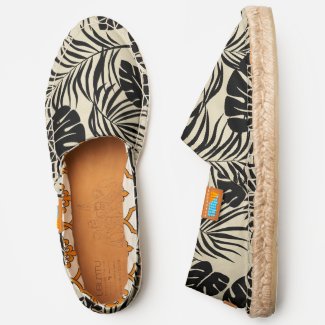
Palm Print Ubuntu Espadrilles
by zazzle
Palm Print Ubuntu Espadrilles
by zazzle
Tip 4. Understand The Trend
Trends play a vital role when it comes to our online print-on-demand journey. Every Year there is a trend of colors and design elements that gain popularity among the industry and the mass. Understanding and keeping up with the trend will benefit us to generate more sales and revenue.
Tip 5. Know Your Target Audience
The predominant tip that needs our attention before designing is this one. If it is unclear for whom we are creating the product, it is easy to miss the mark and loos potential market. Whenever we design a product, asking these questions to understand our ideal target audience is crucial.
- What do they want?
- Where do they live?
- What are their interest and hobby
- What is their age range?
- What is their socio-economic status look likes? etc
Here you have it! If you like the content and would like to support this blog post, please leave a comment and share it with your friends and families.

Comments
Post a Comment